TLDR:
Most contact forms ship with zero spam protection.
CAPTCHA kills conversions and frustrates users.
Instead: enable Cloudflare Turnstile (invisible, AI-based protection) and add a honeypot field.
Takes 30 minutes, stops 95% of spam without punishing real visitors.
Recently, a client complained that they were getting a lot of spam through the website’s contact forms.
So far, I just implemented the default Webflow form and assumed bots and spam are part of the deal.
Turns out most default “contact” forms don’t have spam protection. And once a site gets indexed, bots start to notice and fill out the forms.
The biggest mindset shift came when I realized that spam is a real business problem with costs attached to it, not just a minor inconvenience.
Spam buries leads, wastes time, and makes the client frustrated every time they get an email notification.
So I decided to look into it and see what I need to add to every process from now on to make sure my clients will receive 95% less spam. A few easy steps eliminate the spam issue.
Step 0: Don’t use CAPTCHA
CAPTCHA is the default solution most people think of, and so did my client (but I already told you why you shouldn’t listen to your clients).
While CAPTCHA largely solves the problem of spam, it’s a huge friction point. Lazy UX that leads to frustrated users.
Not to mention it leads to fewer form fills (= fewer leads).
What we want to do instead is create **protection that doesn’t punish real users.**Here’s how we do that.
Step 1: Enable Cloudflare Turnstile protection
Most modern website builders have Cloudflare Turnstile built in as a native option. This is invisible, AI-based protection that stops bots without annoying real users.
For Webflow:
- Go to Site Settings → Apps & Integrations → Cloudflare Turnstile spam protection
- Turn on both “bot blocking” AND “spam filtering”
- Publish your site
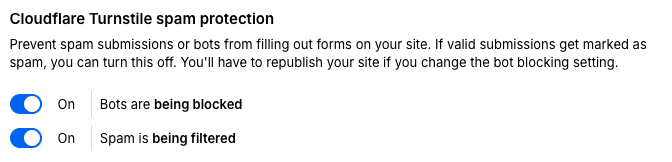
That’s it. Takes 30 seconds.
For other platforms:
If your platform doesn’t have Turnstile built in (check your form settings or site settings first), you’ll need to integrate it via custom code:
- Sign up for a free Cloudflare account
- Get your Turnstile site key and secret key
- Add the Turnstile widget to your form (Cloudflare provides the code snippet)
- Verify submissions server-side using your secret key This is the main layer of protection and will stop ~90% of bots on its own.
Step 2: Add a honeypot
This step seals the deal and provides another layer of protection. Shouldn’t take too long to create.
Here’s how it works:
- Go to your contact form and add another input field (NOT required).
- Give it a realistic name like “Website” or “Company URL” to fool bots.
- Then hide it from view using CSS (opacity: 0 or position: absolute off-screen).
- Then add this code snippet before the closing “ tag:
const submit = document.querySelector("#submit-button");
const honeypot = document.querySelector("#honeypot-field");

honeypot.oninput = function () {
  if (honeypot.value.length > 0) {
    submit.disabled = true;
  }
};
Make sure to:
- Give your submit button an ID of “submit-button” (or change it in the code)
- Give your hidden field an ID of “honeypot-field” (or change it in the code) What this does: Bots will try to fill this field because they can see it in the code, but humans won’t see it and won’t fill it. Once the field is filled, the code recognizes it’s a bot and disables the submit button.
I follow these steps now with every website I build:
✓ Cloudflare Turnstile enabled (invisible protection) ✓ Honeypot field added to every form ✓ Client knows spam is actively handled by me
Spam is a $$$ problem.
Every fake submission your client has to sift through is time they’re not spending on real leads.
- If you’re building sites professionally, add this to your launch checklist.
- If you already have sites live, audit them this week. Most are probably wide open.
- And if you’ve been adding CAPTCHA to forms because “that’s what everyone does”, please stop.